Blame
| 249ca1 | Bernardo Zukerman | 2025-12-04 06:16:58 | 1 | # Welcome to the BlockyCRAFT tutorial! |
| 5a4baa | Bernardo Zukerman | 2025-12-03 20:16:49 | 2 | |
| d798fc | Anonymous | 2025-12-08 00:08:00 | 3 | This tutorial was created to guide you through all the unique mechanics and systems within the game. Here you will learn how to protect your lands, create groups, place bounties on your enemies, and much more. |
| 5a4baa | Bernardo Zukerman | 2025-12-03 20:16:49 | 4 | |
| 5 | --- |
|||
| 6 | ||||
| 249ca1 | Bernardo Zukerman | 2025-12-04 06:16:58 | 7 | ## Authentication |
| 8 | ||||
| d798fc | Anonymous | 2025-12-08 00:08:00 | 9 | To ensure the security of your account and items, we utilize a proprietary authentication system synchronized with the BlockyCRAFT website. |
| 5a4baa | Bernardo Zukerman | 2025-12-03 20:16:49 | 10 | |
| 249ca1 | Bernardo Zukerman | 2025-12-04 06:16:58 | 11 | ::: info |
| 3e26e0 | VitSin | 2025-12-10 16:58:29 | 12 | Your in-game account and your BlockyCRAFT website account **are the same**. If the user `zukerman` created the password `123`, the username and password for logging into the website will be exactly the same. If you change your password, it will also be changed **automatically** on the website. |
| 249ca1 | Bernardo Zukerman | 2025-12-04 06:16:58 | 13 | ::: |
| 5a4baa | Bernardo Zukerman | 2025-12-03 20:16:49 | 14 | |
| 249ca1 | Bernardo Zukerman | 2025-12-04 06:16:58 | 15 | #### Main Commands |
| 5a4baa | Bernardo Zukerman | 2025-12-03 20:16:49 | 16 | |
| de9c2f | Anonymous | 2025-12-08 00:11:01 | 17 | - `/register <password>` - Registers your account. Use this the first time you join. |
| 18 | - `/login <password>` - Logs into your account. Required every time you join the server. |
|||
| 19 | - `/changepassword <new-password>` - Changes your current password. |
|||
| 5a4baa | Bernardo Zukerman | 2025-12-03 20:16:49 | 20 | |
| 249ca1 | Bernardo Zukerman | 2025-12-04 06:16:58 | 21 | #### Important |
| 5a4baa | Bernardo Zukerman | 2025-12-03 20:16:49 | 22 | |
| 23 | - You have **3 login attempts** before being kicked. |
|||
| 24 | - Your inventory is saved and protected. No one can access your items while you are not logged in. |
|||
| d798fc | Anonymous | 2025-12-08 00:08:00 | 25 | - Movement, chat, and interactions are blocked until the player is authenticated. |
| 249ca1 | Bernardo Zukerman | 2025-12-04 06:16:58 | 26 | |
| 3229ca | Bernardo Zukerman | 2025-12-12 13:22:46 | 27 | ### Password Recovery |
| 28 | ||||
| 29 | When you register for the first time, you will receive a recovery code in the game chat. Save this recovery code in a safe place, as it is currently the only method to recover your account. |
|||
| 30 | ||||
| 31 | ::: warning |
|||
| 32 | We do not perform account or password resets, your account is your responsibility! |
|||
| 33 | ::: |
|||
| 34 | ||||
| 35 | #### Recovery Commands |
|||
| 36 | ||||
| 37 | - `/recover <code>` - Recover your account using the recovery code. |
|||
| 38 | - `/newpassword <password>` - Set a new password after validating the code. |
|||
| 39 | - `/generatecode` - Generate a new recovery code. |
|||
| 40 | ||||
| 249ca1 | Bernardo Zukerman | 2025-12-04 06:16:58 | 41 | --- |
| 42 | ||||
| 43 | ## Item Deposit |
|||
| 44 | ||||
| 954241 | VitSin | 2025-12-10 17:05:13 | 45 | In a world without _keep inventory_ and with various rival groups, depositing your valuable items is a great strategy. Depositing items also makes it possible to sell them on the <a href="https://craft.blocky.com.br/markets/" target="_blank">Market</a>. Additionally, having significant assets helps your group climb the ranking. |
| 249ca1 | Bernardo Zukerman | 2025-12-04 06:16:58 | 46 | |
| 47 | #### Commands |
|||
| 48 | ||||
| de9c2f | Anonymous | 2025-12-08 00:11:01 | 49 | - `/deposit all` - Deposits all allowable items from your inventory. |
| 50 | - `/deposit hand` - Deposits only the item currently in your hand. |
|||
| 51 | - `/deposit all hand` - Deposits all items in your inventory that match the item in your hand. |
|||
| 52 | - `/deposit fund` - Deposits items directly into your group treasurer's wallet. |
|||
| d798fc | Anonymous | 2025-12-08 00:08:00 | 53 | |
| 54 | > [!NOTE] |
|||
| 3e26e0 | VitSin | 2025-12-10 16:58:29 | 55 | > To deposit into your group's fund, simply add the parameter `fund` to any deposit command. For example: `/deposit all hand fund` or `/deposit hand fund`, etc. |
| 249ca1 | Bernardo Zukerman | 2025-12-04 06:16:58 | 56 | |
| 3e26e0 | VitSin | 2025-12-10 16:58:29 | 57 | When depositing, items are transferred from your inventory and can be accessed in your <a href="https://craft.blocky.com.br/dashboard/" target="_blank">Wallet</a>. |
| 5a4baa | Bernardo Zukerman | 2025-12-03 20:16:49 | 58 | |
| 59 | --- |
|||
| 60 | ||||
| 249ca1 | Bernardo Zukerman | 2025-12-04 06:16:58 | 61 | ## Land Protection (Claims) |
| 5a4baa | Bernardo Zukerman | 2025-12-03 20:16:49 | 62 | |
| 3e26e0 | VitSin | 2025-12-10 16:58:29 | 63 | Protect your builds and items from other players using our claims system. When you create a claim, it will be displayed on the <a href="https://craft.blocky.com.br/map/" target="_blank">Map</a>. |
| 5a4baa | Bernardo Zukerman | 2025-12-03 20:16:49 | 64 | |
| 249ca1 | Bernardo Zukerman | 2025-12-04 06:16:58 | 65 | ::: warning |
| 3e26e0 | VitSin | 2025-12-10 16:58:29 | 66 | Once a claim is created, it cannot be deleted. To get rid of a claim, you must sell it to another player. Claims can be seized for 30% of their value **if the claim owner remains inactive for 90 days or more**. |
| 249ca1 | Bernardo Zukerman | 2025-12-04 06:16:58 | 67 | ::: |
| 3e26e0 | VitSin | 2025-12-10 16:58:29 | 68 | |
| 69 | ### Protection Blocks |
|||
| 70 | ||||
| 954241 | VitSin | 2025-12-10 17:05:13 | 71 | Before you can make a claim, you will need to acquire **protection blocks**. The currency used to trade and acquire claims is the gold ingot, and **1 gold ingot = 15 protection blocks**, so if you have 10 gold ingots, for example, you can buy 150 blocks for your claim. |
| 3e26e0 | VitSin | 2025-12-10 16:58:29 | 72 | |
| 73 | In order to purchase protection blocks, have your gold ingots in your inventory and use the command `/claim buy <gold-amount>`. |
|||
| 74 | ||||
| 249ca1 | Bernardo Zukerman | 2025-12-04 06:16:58 | 75 | #### How to Create a Protection |
| 954241 | VitSin | 2025-12-10 17:05:13 | 76 | After purchasing your protection blocks, it's time to claim your land: |
| 5a4baa | Bernardo Zukerman | 2025-12-03 20:16:49 | 77 | |
| 249ca1 | Bernardo Zukerman | 2025-12-04 06:16:58 | 78 | 1. Hold a **stick** in your hand. |
| d798fc | Anonymous | 2025-12-08 00:08:00 | 79 | 2. Right-click on two blocks to define the corners of your area (diagonally). |
| 3e26e0 | VitSin | 2025-12-10 16:58:29 | 80 | 3. Use `/claim confirm <claim-name>` to finish the purchase. |
| 249ca1 | Bernardo Zukerman | 2025-12-04 06:16:58 | 81 | |
| 82 | <video width='60%' controls autoplay loop muted> |
|||
| d798fc | Anonymous | 2025-12-08 00:08:00 | 83 | <source src="/Tutorial/Portugu%C3%AAs/ClaimCreate.webm" type="video/webm"> |
| 249ca1 | Bernardo Zukerman | 2025-12-04 06:16:58 | 84 | </video> |
| 5a4baa | Bernardo Zukerman | 2025-12-03 20:16:49 | 85 | |
| 249ca1 | Bernardo Zukerman | 2025-12-04 06:16:58 | 86 | #### Management |
| 5a4baa | Bernardo Zukerman | 2025-12-03 20:16:49 | 87 | |
| a9fc60 | Anonymous | 2025-12-08 00:18:29 | 88 | - `/claim balance` - Checks how many protection blocks you still have available. |
| 3e26e0 | VitSin | 2025-12-10 16:58:29 | 89 | - `/claim list` - Lists all your claims. |
| 90 | - `/trust <player>` - Allows another player to build on your claim. |
|||
| 91 | - `/untrust <player>` - Removes a player's permission. |
|||
| acc614 | Bernardo Zukerman | 2025-12-11 22:42:01 | 92 | - `/claim merge <new-name>` - Merges overlapping claims into one. |
| 5a4baa | Bernardo Zukerman | 2025-12-03 20:16:49 | 93 | |
| 249ca1 | Bernardo Zukerman | 2025-12-04 06:16:58 | 94 | #### Land Market |
| 5a4baa | Bernardo Zukerman | 2025-12-03 20:16:49 | 95 | |
| 3e26e0 | VitSin | 2025-12-10 16:58:29 | 96 | - `/claim sell <price>` - Puts the current claim up for sale. |
| 97 | - `/claim unsell`- Removes the current claim from the market. |
|||
| 98 | - `/claim acquire <new-name>` - Buys a claim that is for sale. |
|||
| 99 | - `/claim occupy <new-name>` - Seizes an abandoned claim for a reduced price. |
|||
| 249ca1 | Bernardo Zukerman | 2025-12-04 06:16:58 | 100 | |
| ab02e8 | Bernardo Zukerman | 2025-12-12 10:58:50 | 101 | ::: warning |
| 3e26e0 | VitSin | 2025-12-10 16:58:29 | 102 | **Group integration:** If you are part of a group, **all members of your group automatically have permission on your claims**. It is not necessary to `/trust` them. |
| ab02e8 | Bernardo Zukerman | 2025-12-12 10:58:50 | 103 | ::: |
| 5a4baa | Bernardo Zukerman | 2025-12-03 20:16:49 | 104 | |
| 105 | --- |
|||
| 106 | ||||
| 249ca1 | Bernardo Zukerman | 2025-12-04 06:16:58 | 107 | ## Groups |
| 5a4baa | Bernardo Zukerman | 2025-12-03 20:16:49 | 108 | |
| d798fc | Anonymous | 2025-12-08 00:08:00 | 109 | Join other players, dominate the server, and climb the ranking! Your group can be anything from a nation to a company specialized in the market. If you create or join an existing group, your claims are trusted to all group members as long as you belong to it. Your claims remain individual; joining or leaving a group does not affect ownership. |
| 110 | ||||
| 111 | :::success |
|||
| 3e26e0 | VitSin | 2025-12-10 16:58:29 | 112 | Join a good group so you can rise together on the <a href="https://craft.blocky.com.br/scoreboard/" target="_blank">Scoreboard</a>! |
| d798fc | Anonymous | 2025-12-08 00:08:00 | 113 | ::: |
| 5a4baa | Bernardo Zukerman | 2025-12-03 20:16:49 | 114 | |
| 249ca1 | Bernardo Zukerman | 2025-12-04 06:16:58 | 115 | #### Basic Commands |
| 5a4baa | Bernardo Zukerman | 2025-12-03 20:16:49 | 116 | |
| a9fc60 | Anonymous | 2025-12-08 00:18:29 | 117 | - `/grp create <tag> <name>` - Creates a new group. |
| 118 | - `/grp invite <player>` - Invites someone to your group. |
|||
| 119 | - `/grp join <group>` - Accepts an invitation. |
|||
| 120 | - `/grp leave` - Leaves the current group. |
|||
| 121 | - `/gc <message>` - Sends a message in the group chat. |
|||
| 5a4baa | Bernardo Zukerman | 2025-12-03 20:16:49 | 122 | |
| 249ca1 | Bernardo Zukerman | 2025-12-04 06:16:58 | 123 | #### Management |
| 5a4baa | Bernardo Zukerman | 2025-12-03 20:16:49 | 124 | |
| a9fc60 | Anonymous | 2025-12-08 00:18:29 | 125 | - `/grp promote <player> <role>` - Promotes or demotes members. |
| 77abde | Anonymous | 2025-12-08 00:19:51 | 126 | - `/grp kick <player>` - Removes a player from the group. |
| d798fc | Anonymous | 2025-12-08 00:08:00 | 127 | - `/grp setbase` - Sets the group base where members can teleport. |
| 3e26e0 | VitSin | 2025-12-10 16:58:29 | 128 | - `/grp pvp <on/off>` - Enables or disables friendly fire. |
| 5a4baa | Bernardo Zukerman | 2025-12-03 20:16:49 | 129 | |
| 249ca1 | Bernardo Zukerman | 2025-12-04 06:16:58 | 130 | #### Ranking and Base |
| 5a4baa | Bernardo Zukerman | 2025-12-03 20:16:49 | 131 | |
| d798fc | Anonymous | 2025-12-08 00:08:00 | 132 | - `/grp rank` - Views the richest groups on the server based on assets. |
| 133 | - `/grp base` - Teleports to the group base (30s cooldown if in combat). |
|||
| 5a4baa | Bernardo Zukerman | 2025-12-03 20:16:49 | 134 | |
| 135 | --- |
|||
| 136 | ||||
| 0616c5 | Bernardo Zukerman | 2026-02-20 04:37:35 | 137 | ## Duels |
| 138 | ||||
| 139 | Settle your disputes or prove you are the strongest in the Arena. The duel system allows two players to face each other in isolated arenas with their own bets, ensuring that no one interferes in the fight (fair 1v1). |
|||
| 140 | ||||
| 141 | #### Duel Phases |
|||
| 142 | ||||
| 143 | A duel happens in different stages to ensure both sides are prepared: |
|||
| 144 | 1. **Challenge**: A player sends the duel request, defining the arena. |
|||
| 145 | 2. **Betting**: After accepting, the betting phase opens. Any spectator can bet their iron ingots on who they think will win. At the end of the duel, the total bet amount is divided among the winners, with a portion (fee) going to the arena. |
|||
| 146 | 3. **Warmup**: Both players must type `/duel start` to confirm they are ready. If they take more than 7 days, the duel expires and the bets return to their owners. |
|||
| 147 | 4. **Fighting**: Just the two players and their skills unleashed in the arena. Whoever quits or dies, loses. |
|||
| 148 | ||||
| 10c920 | Bernardo Zukerman | 2026-02-20 04:38:43 | 149 | ::: warning |
| 0616c5 | Bernardo Zukerman | 2026-02-20 04:37:35 | 150 | It is not possible to start a fight against a member of your own group if the **Friendly Fire** (PvP) configuration of the group is disabled, and no officer can disable it while there is an active duel going on between you. |
| 151 | ::: |
|||
| 152 | ||||
| 153 | #### Basic Commands |
|||
| 154 | ||||
| 155 | - `/duel <player> <arena>` - Challenges a player to a duel in a specific arena. |
|||
| 156 | - `/duel accept` - Accepts the last pending challenge received. |
|||
| 157 | - `/duel deny` - Refuses the last pending challenge received. |
|||
| 158 | - `/duel start` - Marks that you are ready in an already accepted duel. The fight will start when both players type the command. |
|||
| 159 | - `/duel forfeit` - Cancels a duel in the betting phase before it starts, refunding all spectators. |
|||
| 160 | ||||
| 161 | #### Betting & Arena Commands |
|||
| 162 | - `/bet <player> <amount>` - Bet your iron ingots on one of the fighters (The duel must be in the betting phase). |
|||
| b4b2b3 | Bernardo Zukerman | 2026-02-21 23:30:21 | 163 | - `/bets` - Shows the central open bets with the active fees, prizes, and multipliers (_odds_). |
| 0616c5 | Bernardo Zukerman | 2026-02-20 04:37:35 | 164 | |
| 165 | #### Arenas |
|||
| 166 | ||||
| 167 | The arena is the stage for the duel. **Only group leaders** can create and manage the infrastructure of an arena for their group. |
|||
| 168 | To create and profit from an arena, follow the requirements: |
|||
| 169 | 1. The leader must own a protection (claim) in the chosen location. |
|||
| 170 | 2. Position yourself properly at the location and use `/arena create <name>`. This will set that protected land as the arena, allowing duelists to be teleported to it. |
|||
| 171 | 3. (Optional) Setup an entry fee for your arena using `/arena fee <name> <value>`. This value in `%` ranging from `0 to 100` dictates the percentage of the total bet that will be transferred to the wallet (fund) of the group owning the arena at the end of the duel. |
|||
| 172 | ||||
| 173 | --- |
|||
| 174 | ||||
| 249ca1 | Bernardo Zukerman | 2025-12-04 06:16:58 | 175 | ## Bounties |
| 5a4baa | Bernardo Zukerman | 2025-12-03 20:16:49 | 176 | Want to see someone eliminated? Put a price on their head! |
| 177 | ||||
| 249ca1 | Bernardo Zukerman | 2025-12-04 06:16:58 | 178 | #### Commands |
| 5a4baa | Bernardo Zukerman | 2025-12-03 20:16:49 | 179 | |
| 77abde | Anonymous | 2025-12-08 00:19:51 | 180 | - `/bounty <player> <amount>` - Places a bounty for the death of a player. |
| d798fc | Anonymous | 2025-12-08 00:08:00 | 181 | - `/bounty list` - Views the list of wanted players. |
| 77abde | Anonymous | 2025-12-08 00:19:51 | 182 | - `/bounty remove <player>` - Removes a bounty you placed and recovers your iron. |
| 5a4baa | Bernardo Zukerman | 2025-12-03 20:16:49 | 183 | |
| 249ca1 | Bernardo Zukerman | 2025-12-04 06:16:58 | 184 | #### Details |
| 5a4baa | Bernardo Zukerman | 2025-12-03 20:16:49 | 185 | |
| 249ca1 | Bernardo Zukerman | 2025-12-04 06:16:58 | 186 | - If you kill a player with a bounty, the reward goes directly to your inventory. |
| 824609 | Anonymous | 2025-12-08 00:48:06 | 187 | |
| 188 | :::danger |
|||
| 189 | You cannot place bounties on members of your own group, and killing members of your group does not award you the bounty. |
|||
| 190 | ::: |
|||
| 5a4baa | Bernardo Zukerman | 2025-12-03 20:16:49 | 191 | |
| 192 | --- |
|||
| 193 | ||||
| 249ca1 | Bernardo Zukerman | 2025-12-04 06:16:58 | 194 | ## Help |
| 5a4baa | Bernardo Zukerman | 2025-12-03 20:16:49 | 195 | |
| 196 | Need to remember a command? |
|||
| 197 | ||||
| 77abde | Anonymous | 2025-12-08 00:19:51 | 198 | - `/help` - Opens the help menu with the list of server commands. |
| 199 | - `/help <page>` - Navigates through the help pages. |
|||
| 5a4baa | Bernardo Zukerman | 2025-12-03 20:16:49 | 200 | |
| 201 | --- |
|||
| 1bfa33 | Bernardo Zukerman | 2026-02-13 12:15:49 | 202 | |
| 203 | ## Stock Exchange |
|||
| 204 | ||||
| 205 | The BlockyCRAFT economy revolves around the Stock Exchange. This is where you can multiply your wealth by trading items (commodities) in real-time with other players. The base currency for all major trades is the **Iron Ingot (IRON)**. |
|||
| 206 | ||||
| 244550 | Bernardo Zukerman | 2026-02-13 12:33:07 | 207 | 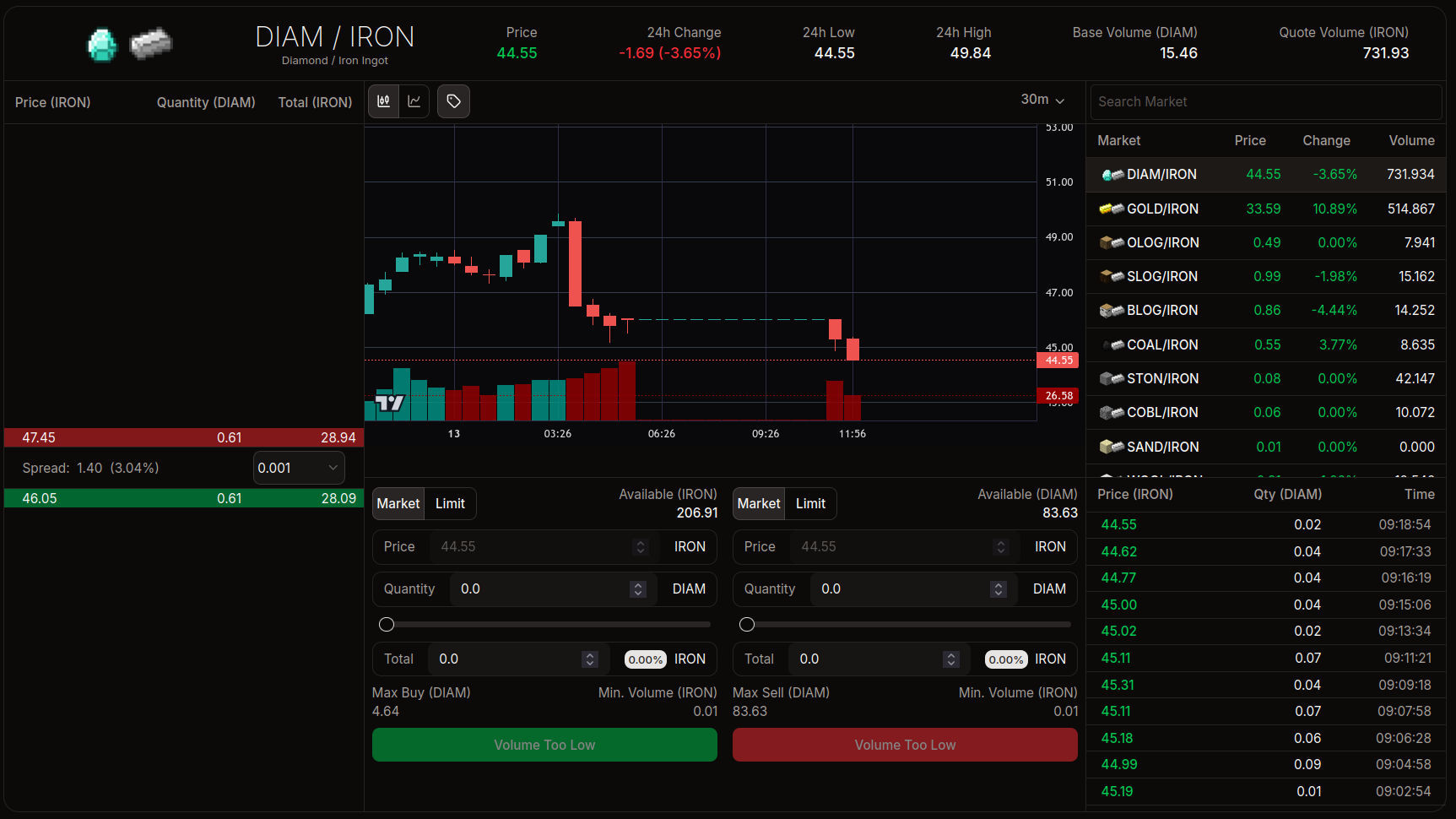 |
| 1bfa33 | Bernardo Zukerman | 2026-02-13 12:15:49 | 208 | |
| 209 | ### Interface Overview |
|||
| 210 | ||||
| 211 | The interface is divided into panels that provide vital information for your trades: |
|||
| 212 | ||||
| 213 | 1. **Trading Pair (Top):** Shows which item is being traded (e.g., `DIAM/IRON` means Diamonds for Iron). |
|||
| 214 | 2. **Price Chart (Center):** A candlestick chart showing the appreciation or depreciation of the item over time. |
|||
| 215 | 3. **Order Book (Left):** List of all open buy and sell orders. |
|||
| 216 | 4. **Order Panel (Below the chart):** Where you execute your buy or sell operations. |
|||
| 217 | 5. **Market List (Right):** Other items available for trading (Gold, Coal, Cobblestone, etc.). |
|||
| 218 | 6. **Market History (Lower Right):** Shows the entire history of that market. |
|||
| 219 | ||||
| 220 | ### Order Book |
|||
| 221 | ||||
| 222 | The "Order Book" is the heart of the market. It shows the players' intentions. |
|||
| 223 | ||||
| b0135e | Bernardo Zukerman | 2026-02-13 12:16:59 | 224 | 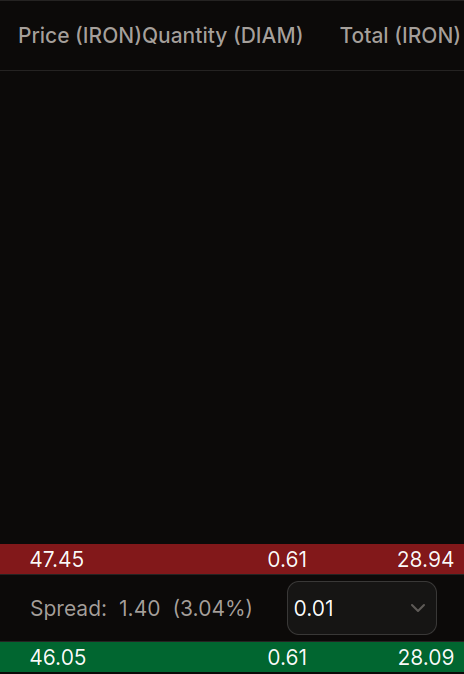 |
| 1bfa33 | Bernardo Zukerman | 2026-02-13 12:15:49 | 225 | |
| 226 | - **Red (Upper part):** **Sell** orders. Players wanting to sell the item and asking a price for it. |
|||
| 227 | - **Green (Lower part):** **Buy** orders. Players wanting to buy the item and offering a price. |
|||
| 228 | - **Spread:** The difference between the cheapest sell price and the highest buy price. |
|||
| 229 | ||||
| 230 | ::: info |
|||
| 231 | In the example image, there are two buy orders and two sell orders, with a 2.88% price difference (spread). |
|||
| 232 | ::: |
|||
| 233 | ||||
| 234 | ### How to Buy and Sell |
|||
| 235 | ||||
| 236 | In the lower center panel, you will find the trading forms. |
|||
| 237 | ||||
| 244550 | Bernardo Zukerman | 2026-02-13 12:33:07 | 238 | 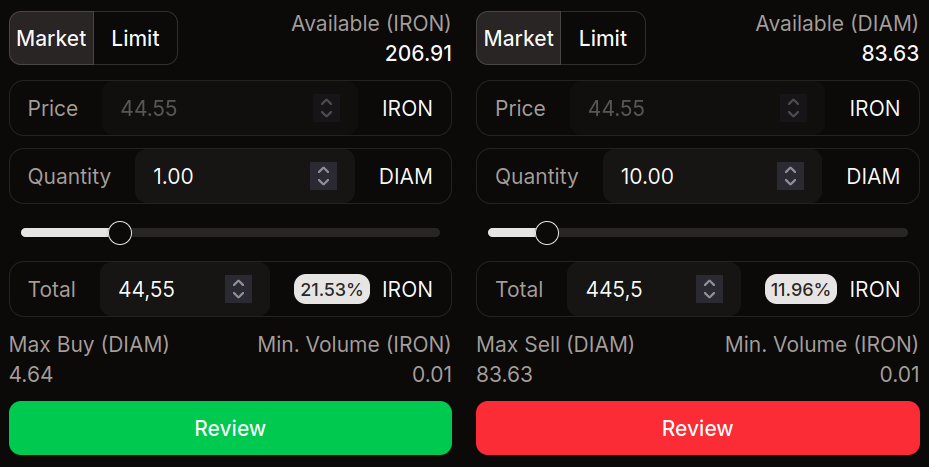 |
| 1bfa33 | Bernardo Zukerman | 2026-02-13 12:15:49 | 239 | |
| 240 | #### Order Types |
|||
| 241 | ||||
| 242 | You can trade in two ways by selecting the **Market** or **Limit** tabs: |
|||
| 243 | ||||
| 244 | - **Market:** Buys or sells **immediately** at the best available price in the order book. It's fast, but you don't choose the exact price. |
|||
| 245 | - **Limit:** You set the **Price** you want to pay or receive. Your order will remain in the order book waiting for someone to accept it. |
|||
| 246 | ||||
| 247 | #### Filling the Order |
|||
| 248 | ||||
| 249 | 1. **Price:** How much each unit costs (Limit orders only). |
|||
| 250 | 2. **Quantity:** How many items you want to trade (e.g., how many Diamonds). |
|||
| 251 | 3. **Total:** The total value of the transaction in Iron Ingots. |
|||
| 252 | ||||
| 253 | ::: info |
|||
| 254 | Use the slider below the fields to automatically fill a percentage of your available balance (e.g., use 50% of your Iron to buy Diamonds). |
|||
| 255 | ::: |
|||
| 256 | ||||
| 257 | ### History and Other Markets |
|||
| 258 | ||||
| 259 | On the right side, you can monitor what is happening in real-time. |
|||
| 260 | ||||
| 244550 | Bernardo Zukerman | 2026-02-13 12:33:07 | 261 | 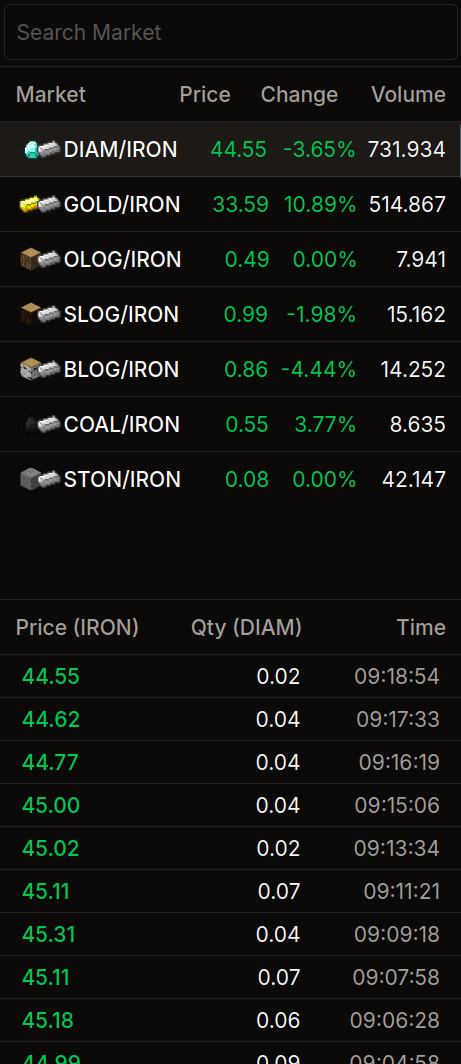 |
| 1bfa33 | Bernardo Zukerman | 2026-02-13 12:15:49 | 262 | |
| 263 | - **Instrument List:** Click on a pair (e.g., `GOLD/IRON`) to switch markets and view that item's chart. |
|||
| 264 | - **Trade History:** Shows the latest successfully executed transactions, allowing you to see what the item is actually trading for. |
|||
| 265 | ||||
| 266 | --- |
|||
| 267 | ||||
| 268 | ## BMM (Blocky Market Maker) |
|||
| 269 | ||||
| 270 | For advanced players who wish to provide liquidity to the market and profit from the _spread_, we offer the **[BMM](https://github.com/zukrmn/BlockyMarketMaker)**. This is an open-source bot, developed in Python, that automates your trades on the BlockyCRAFT Stock Exchange. |
|||
| 271 | ||||
| 272 | The bot operates with **Market Making** strategies, placing buy and sell orders simultaneously to capture the price difference (spread), ensuring liquidity for the server and profit for the operator. |
|||
| 273 | ||||
| 274 | ::: danger |
|||
| 275 | **Risk Warning:** Using bots involves financial risks. An incorrect configuration can quickly drain your IRON balance or items. Test with low values before operating heavily. Do not use the bot's default settings and modify at your own risk. |
|||
| 276 | ::: |
|||
| 277 | ||||
| 278 | ### Features |
|||
| 279 | ||||
| 280 | - **Automated Market Making:** Maintains active buy and sell orders. |
|||
| 281 | - **Auto-Hedge and Rebalancing:** Automatically adjusts prices based on the market. |
|||
| 282 | - **WebSocket Integration:** Reacts to trades in real-time (low latency). |
|||
| 283 | - **Local Web Dashboard:** Visual interface to track your profits and status. |
|||
| 284 | - **Circuit Breaker:** Automatically pauses trading if volatility is extreme or if the API fails. |
|||
| 285 | ||||
| 286 | ### To create your own Market Making bot, here are useful links: |
|||
| 287 | ||||
| 288 | - <a href="https://craft.blocky.com.br/docs/" target="_blank">API Documentation</a> |
|||
| 289 | - <a href="https://craft.blocky.com.br/docs/llms.txt" target="_blank">Initial LLM Prompt</a> |
|||
| 290 | - <a href="https://pypi.org/project/blockypy/" target="_blank">PyPi Package</a> |
|||
| 291 | ||||
| 292 | --- |